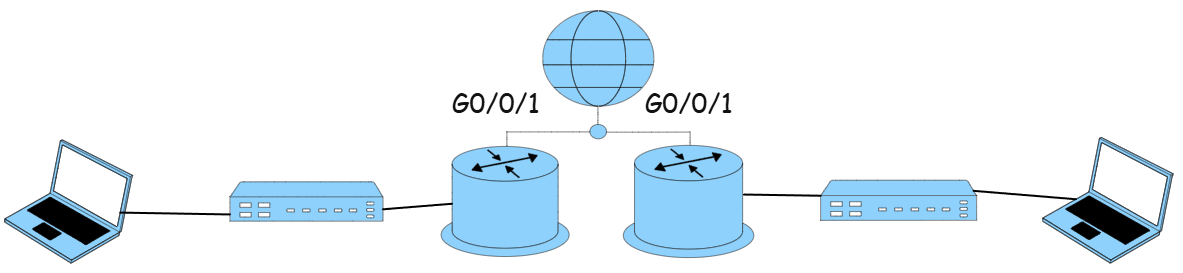
Addressing Table
| Device | Interface | IP Address | Subnet | Default Gateway |
|---|---|---|---|---|
| R1 | G0/0 | 10.10.10.1 | 255.255.255.192 | |
| G0/1 (WAN) | 172.16.100.1 | 255.255.255.252 | ||
| R2 | G0/0 | 192.168.20.1 | 255.255.255.192 | |
| G0/1 (WAN) | 172.16.100.2 | 255.255.255.252 | ||
| S1 | F0/1 | 10.10.10.5 | 255.255.255.192 | |
| S2 | F0/1 | 192.168.20.5 | 255.255.255.192 | |
| PC1 | 10.10.10.50 | 255.255.255.192 | ||
| PC2 | 192.168.20.50 | 255.255.255.192 |
| Task | Specification |
|---|---|
| Router name | R1 |
| Domain name | r1.labnet.local |
| Encrypted privileged exec password | R1secure! |
| Console access password | R1console |
| Encrypt the clear text passwords | Yes |
| MOTD Banner | “R1 Authorized Access Only” |
| Interface G0/0 | Set Description |
| Set IP Address | |
| Activate Interface | |
| Interface G0/1 | Set Description |
| Set IP Address | |
| Activate Interface |
| Task | Specification |
|---|---|
| Router name | R2 |
| Domain name | r2.labnet.local |
| Encrypted privileged exec password | R2secure! |
| Console access password | R2console |
| Encrypt the clear text passwords | Yes |
| MOTD Banner | “R2 Network – No Unauthorized Access” |
| Interface G0/0 | Set Description |
| Set IP Address | |
| Activate Interface | |
| Interface G0/1 | Set Description |
| Set IP Address | |
| Activate Interface |
| Task | Specification |
|---|---|
| Switch name | SW1 |
| Configure Management Interface (SVI) | Set the Layer 3 IPv4 Address |
| Encrypted privileged exec password | B0nza! |
| Set console access password | Con@cc1 |
| Set the SSH password | TelNetSux |
| Set the Default Gateway Address |
| Task | Specification |
|---|---|
| Switch name | SW2 |
| Configure Management Interface (SVI) | Set the Layer 3 IPv4 Address |
| Encrypted privileged exec password | B0nza! |
| Set console access password | Con@cc1 |
| Set the SSH password | TelNetSux |
| Set the Default Gateway Address |
| PC1 Network Configuration | |
|---|---|
| IP Address | 10.10.10.50 |
| Subnet Mask | 255.255.255.192 |
| Default Gateway | |
| PC2 Network Configuration | |
|---|---|
| IP Address | 192.168.20.50 |
| Subnet Mask | 255.255.255.192 |
| Default Gateway | |
Upon completing your local network, attempt to connect to a neighboring network. Use routing for a Gateway of Last Resort for simplified setup in this lab.
ip route 0.0.0.0 0.0.0.0 {ip-address | exit-int}